
At Treatwell, we want to give you all the tools you need to get more online bookings and fill the free slots in your diary. To do this, we work with Google to expand your customers' booking options, specifically with the Reserve with Google service.
What is Reserve with Google?
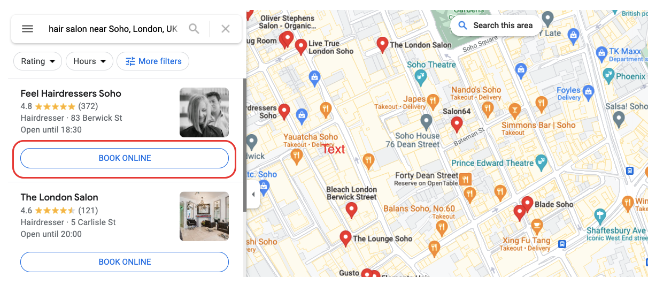
Reserve with Google is a service that offers you another option to grow your business online: your customers will be able to book directly with Google through search results or by viewing your salon on Google Maps.
They will be able to find you through the name of your salon, but also by carrying out more generic searches based on geographical location, for example, by typing "Hairdressers in Milan" on Google or Google Maps, or simply "Hairdressers in the area", if they have GPS active on their smartphone.
What are the benefits of using Reserve with Google?
Google is the most used search engine by customers to search for information about salons (such as addresses, photos, or reviews from other customers).
When users carry out a search on Google, for example, "Hairdressers in Milan," they will be able to see your business in the search result; therefore, by activating the Reserve with Google feature, you will be able to expand your customers' booking possibilities and increase the number of appointments in your salon.
How does Reserve with Google work?
As of April 2024, Google has made some changes to comply with the European Union's Digital Markets Act (DMA). One of these included the removal of some features from the search results page that allowed customers to complete reservations without ever leaving the Google Search or Google Maps page, via the Reserve with Google feature. As a result, customers can now find your salon on Google and then finalize their bookings directly from your Treatwell marketplace page.
How can a customer make a booking through Reserve with Google?
The customer searches on Google, finds your business, and clicks on “Book”
It takes them to your page in the Treatwell Marketplace
They can select the desired treatments, the time, and the date available in your diary
The customer will receive a notification confirming their booking
The appointment will automatically appear in your agenda
After the appointment, the customer will receive an email invitation to leave a review.
If the customer completes the booking from your Treatwell page, the same conditions and fees will apply as per a normal booking made from the Marketplace. For this reason, current loyal customers who book via Reserve with Google will be automatically identified by the system. Make sure your customer list is always up to date so the system will always recognise your loyal customers.
What are the conditions with Reserve with Google?
To receive bookings from Google:
Your salon will need to be registered on Google; otherwise, you will need to create your page via Google My Business. If you don't know how, don't worry, we'll help you!
Your Treatwell page must be active and visible on the Treatwell marketplace.
To be eligible, it is required that your salon have a fixed address. Mobile venues won’t be able to take advantage of the Reserve with Google integration.
How can I activate or deactivate the Reserver with Google service?
To request the activation or deactivation of the Reserve with Google service, you can reach out to us via our Chat Support.
Can customers still find my number on Google?
Yes, your salon information (such as website, phone number, etc.) will always appear above the Book Now button, so all clients will still be able to find it easily.
Will Reserve with Google affect my Google Ads?
No, if you are using Google Ads, your ads will not be affected by the Reserve with Google feature. They will simply complete your setup and potentially increase your business.
Will using Reserve with Google stop customers from calling me directly?
No, Book with Google is an addition to your online presence that allows customers to reserve an appointment in just a few clicks, expanding and improving their booking experience.
Your phone number and website will still remain the primary information, giving customers the option to contact you directly if they prefer.
If my loyal customers book through Google, will they be recognized?
Of course, if your customer list is always updated, bookings through Google will follow the usual rules of distinction between new and loyal customers.
If customers book through Google, will they be invited to leave a review?
By completing their booking directly on the Treatwell Marketplace, they will not only be asked to leave a review, but will also receive reminders, invitations to rebook, and more. You can send customers a link (encouraging them to download the App and book at your salon in seconds) directly from Connect.
On your Google My Business profile, customers will also be able to see your review score, based on an average of your Treatwell reviews. To improve your score, encourage customers to leave a positive review on your Treatwell page if they are satisfied with their experience.
We recommend that you always encourage your team to gather customer feedback once a treatment is finished and then ask for a review. Take some time to explain which channels your salon is present on: Google My Business, Facebook, and, of course, your Treatwell page.
Was this article helpful?